Key Risk Indicators (KRIs)
KRIs are metrics that quantify your privileged access risk posture. Each KRI measures a specific aspect of risk and uses RAG (Red/Amber/Green) thresholds to indicate severity.
KRI Overview
Navigate to KRIs to see all current indicator values.
Each KRI card shows:
| Element | Description |
|---|---|
| Name | What is being measured |
| Current Value | Latest count or percentage |
| RAG Status | Green (within tolerance), Amber (warning), or Red (critical) |
| Change | Increase or decrease since the last snapshot |
Built-in KRIs
KRI cards are shown in the order below. The Community column shows which 4 KRIs are included in the free edition — all others require Pro or Enterprise (see Licensing).
| KRI | Description | Community |
|---|---|---|
| Privileged Without Owner | Enabled privileged accounts with no linked identity | Yes |
| Standing Privileges | All enabled accounts with privileged entitlements (always-on, not just-in-time) | Yes |
| Not in PAM Tool | Privileged accounts not linked to a PAM inventory entry | Yes |
| Shared/Non-Human Privileged Accounts | Non-human (shared/service) accounts with privileged entitlements | Pro+ |
| Inactive Identity with Privileged Account | Privileged accounts linked to inactive or out-of-date identities | Pro+ |
| High-Risk Unmanaged Privileged Accounts | Privileged accounts on High/Critical-risk systems not in PAM | Pro+ |
| Stale Passwords on Privileged Accounts | Privileged accounts with passwords older than the threshold age | Pro+ |
| Dormant Privileged Accounts | Privileged accounts with no logon within the threshold period | Pro+ |
| Disabled Accounts in PAM | Disabled accounts that still exist in the PAM inventory | Pro+ |
| Account-Identity Type Mismatch | Accounts where the account type doesn't match the linked identity's type | Pro+ |
| Unlinked Accounts | All accounts (privileged or not) not linked to any identity | Yes |
| Systems Never Scanned | Active systems that have never been scanned | Pro+ |
| Systems with Stale Scans | Active systems not scanned within the threshold period | Pro+ |
| Systems Without Credentials | Active systems with no configured credentials | Pro+ |
| Privileged Services with Non-Privileged Account | Privileged services running as a non-privileged account | Pro+ |
| Privileged Services Without Account | Privileged services with no linked run-as account | Pro+ |
| Scan Failure Rate | Percentage of scans that failed or partially completed within the period | Pro+ |
| Unclassified Entitlements | Entitlements not yet classified as privileged or non-privileged | Pro+ |
| Privileged Account Concentration | Systems exceeding the privileged account concentration threshold | Pro+ |
| PAM Coverage Ratio | Percentage of privileged accounts managed in your PAM tool | Pro+ |
| Open Threat Detections | Unresolved Threat Detections currently in Open status | Pro+ |
| High-Confidence Threat Detections | Open Threat Detections with an ML-adjusted confidence score above 0.80 | Pro+ |
| Accounts with Active Threat Detections | Distinct privileged accounts with at least one open Threat Detection | Pro+ |
| Confirmed Threat Detection Rate | Percentage of resolved Threat Detections confirmed as true positives | Pro+ |
| Unacknowledged High-Confidence Threats | Open high-confidence Threat Detections left unacknowledged past the threshold age | Pro+ |
| Offline Monitor Agents | Endpoint Sensors that stopped heartbeating and were marked Offline | Pro+ |
| Systems with Overdue Attestation Requests | Systems with an attestation request that expired without being submitted or cancelled | Pro+ |
| Systems Overdue for Scheduled Attestation | Systems on a scheduled attestation cadence that haven't completed one within their configured period | Pro+ |
| Privileged Access Attestation Completion Rate | Percentage of attestation requests submitted rather than left to expire | Pro+ |
KRI Definitions
Navigate to KRIs and view the definitions to see or edit the configuration for each KRI.
Each definition has:
| Field | Description |
|---|---|
| Code | Unique identifier (e.g., PRIVILEGED_WITHOUT_OWNER) |
| Name | Display name |
| Description | What the KRI measures and why it matters |
| Green Threshold | Values at or below this are healthy |
| Amber Threshold | Values between Green and Red are a warning |
| Red Threshold | Values at or above this are critical |
| Enabled | Whether the KRI is active |
Thresholds are inclusive. For example, if Green = 5, Amber = 15, and Red = 16, then a value of 5 is Green, 15 is Amber, and 16 is Red.
Editing Thresholds
- Click on a KRI definition
- Adjust the Green, Amber, and Red threshold values
- Click Save
Threshold changes take effect immediately on the dashboard and KRI pages.
KRI Snapshots
Requires Pro or Enterprise edition.
Snapshots capture a point-in-time record of all KRI values. They are used to build trend charts and track progress over time.
Automatic Snapshots
A snapshot is taken automatically each time a scan completes.
Manual Snapshots
- Navigate to KRIs > Snapshots
- Click Take Snapshot
Viewing Snapshots
The snapshots page shows a table of all historical snapshots with their timestamp and KRI values. Click a snapshot to see its full breakdown.
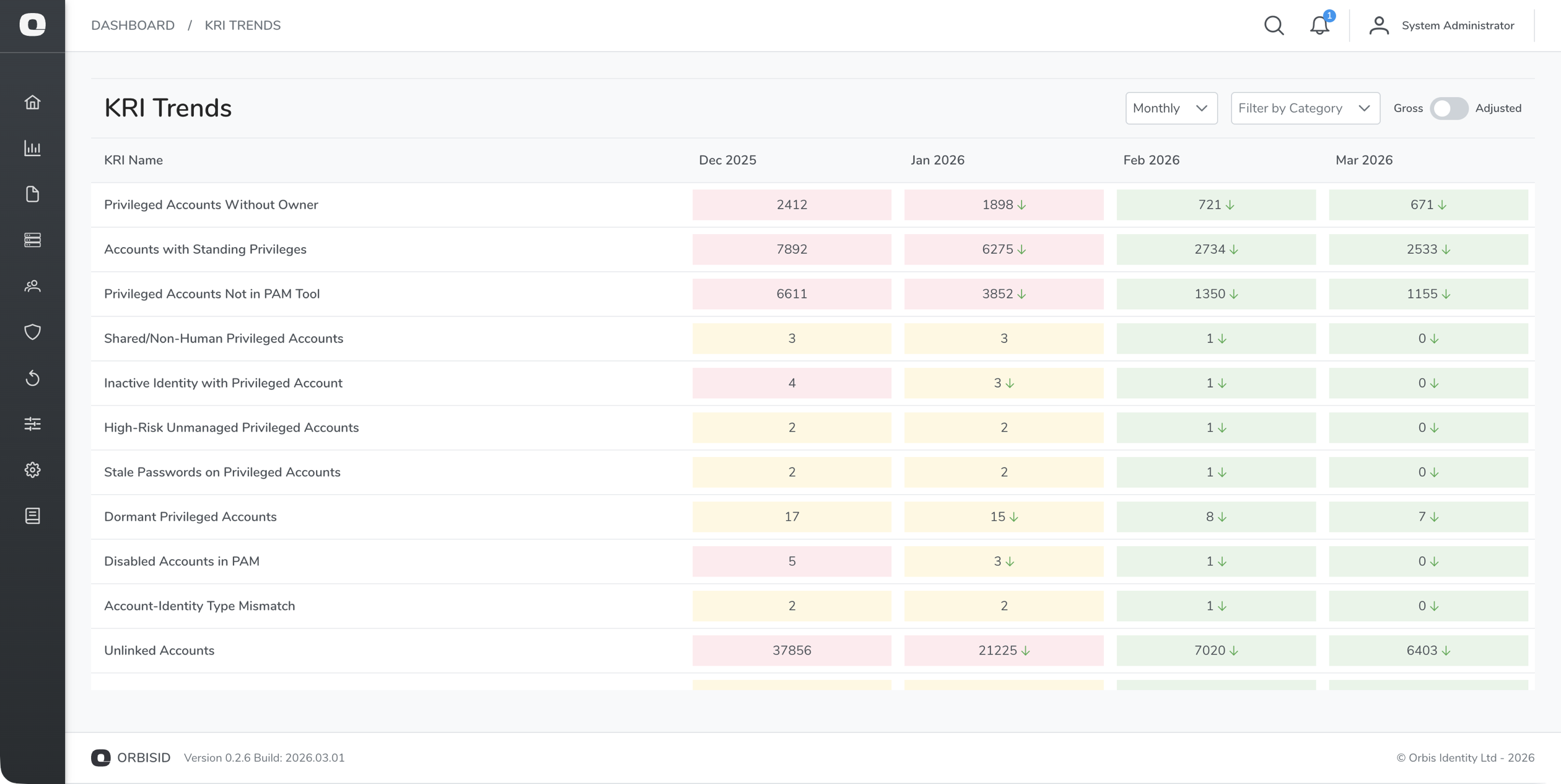
KRI Trends
Requires Pro or Enterprise edition.
Navigate to KRIs > Trends to view KRI values over time as a chart.
- Select one or more KRIs to display
- Choose a time range
- The chart background uses RAG colouring to show threshold bands
This makes it easy to spot whether your risk posture is improving or deteriorating.
KRI Exceptions
Requires Enterprise edition.
Exceptions allow you to formally acknowledge and exclude specific accounts from KRI calculations. This is useful for accounts that have been reviewed and accepted as a known risk.
Creating an Exception
- Navigate to KRIs > Exceptions
- Click Add Exception
- Fill in:
| Field | Required | Description |
|---|---|---|
| KRI | Yes | Which KRI this exception applies to |
| Account | Yes | The account being excepted |
| Reason | Yes | Justification for the exception |
| Approver | Yes | Who approved this exception |
| Expiry Date | No | When the exception expires (must be re-approved after this date) |
- Click Save
Managing Exceptions
- Expired exceptions are highlighted in amber and should be reviewed and either renewed or removed
- Delete an exception to bring the account back into KRI calculations
- All exception changes are recorded in the audit log