Dashboard
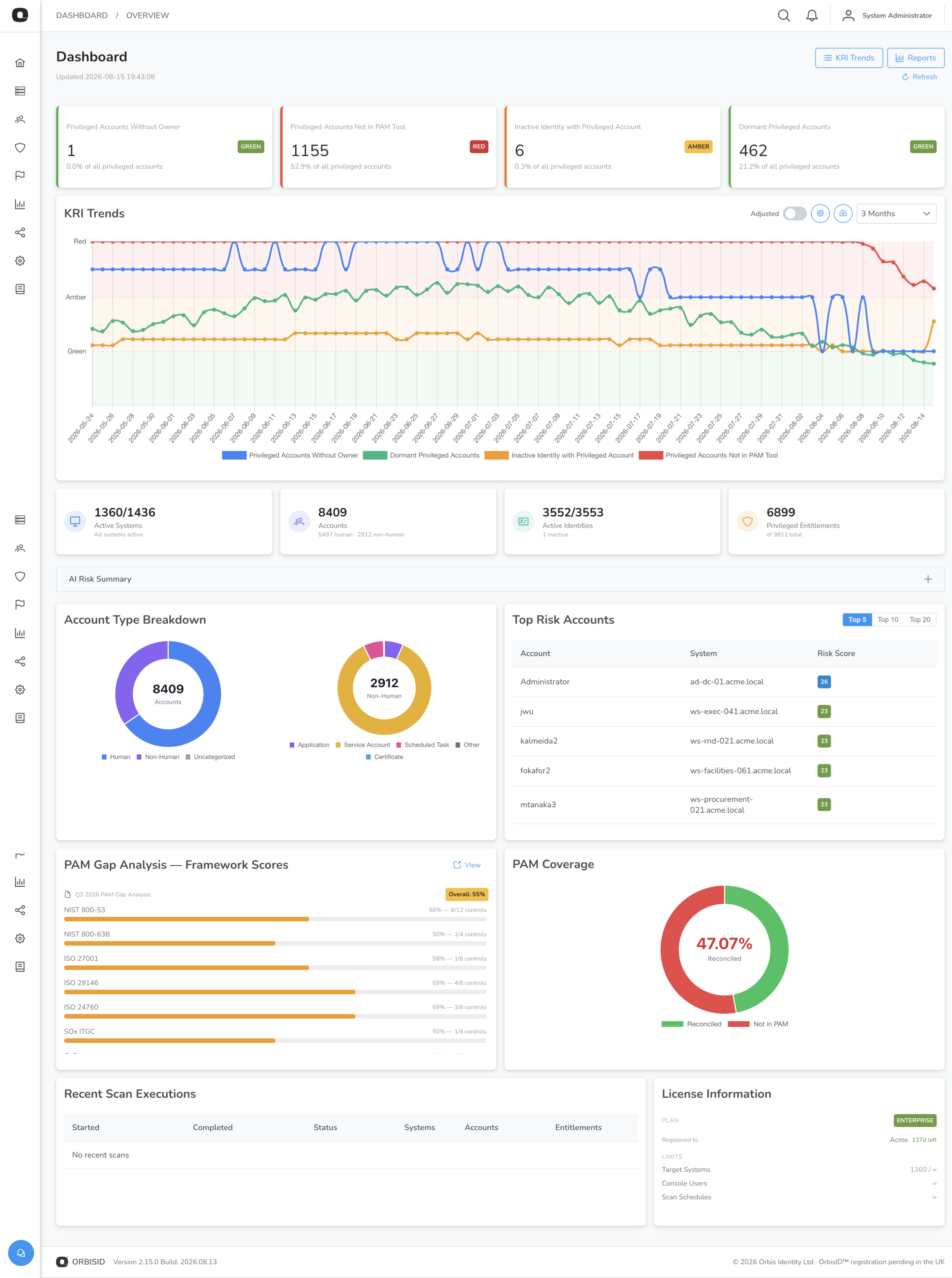
The Dashboard is the landing page after login. It provides an at-a-glance view of your privileged access risk posture.
AI Risk Summary
If Risk Narrative Summarisation is enabled, an AI Risk Summary panel appears directly above Threat Detection Alerts, broken into three columns — Current State, Progress Since Last Month, and Recommended Next Steps — summarising your latest scan's KRI values and how they've changed. The panel is collapsible and is hidden entirely when the feature is off or before your first scan.
There's no regenerate control on the Dashboard itself — the summary refreshes automatically as a side effect of each scan. To generate or refresh it on demand (e.g. before your first scan, or to preview a change), an administrator can use Generate Risk Summary Now in Administration > Settings > OrbisAI.
KRI Summary Cards
The top of the dashboard shows a card for each active Key Risk Indicator (KRI). Each card displays:
| Element | Description |
|---|---|
| KRI name | The indicator being measured |
| Current value | The latest calculated count or percentage |
| RAG status | Green, Amber, or Red based on configured thresholds |
| Trend arrow | Up, down, or flat compared to the previous value |
The Community edition shows 4 KRIs (Privileged Without Owner, Unlinked Accounts, Not in PAM Tool, Standing Privileges). Pro and Enterprise editions show all KRIs.
KRI Trend Chart
Below the summary cards, a line chart shows KRI values over time. The chart background is colour-coded using RAG bands so you can see at a glance whether values are trending into warning or critical zones.
System Summary
The system summary panel shows:
| Metric | Description |
|---|---|
| Total Systems | Number of target systems in inventory |
| Active Systems | Systems currently in scope for scanning |
| Offboarded Systems | Systems removed from scope (history preserved) |
| Total Accounts | All discovered accounts across all systems |
| Linked Accounts | Accounts matched to an identity |
| Unlinked Accounts | Accounts without an identity owner |
| Total Identities | Number of identities in the system |
Top Risk Accounts
A widget lists the highest-scoring privileged accounts estate-wide by Privileged Account Risk Score, each showing its system, owner-linked status, and score. Click a row to jump to that account. This gives a small IT team or MSP technician a ranked "deal with these first" list without cross-referencing multiple KRI reports.
Recent Scans
A table at the bottom shows the most recent scan executions with:
- Scan policy name
- Start and end times
- Status (Completed, Failed, Running, Cancelled)
- Number of systems scanned
Click a scan to view its detailed logs.
Data Refresh
Dashboard data is refreshed automatically when the page loads. To refresh manually, navigate away and back, or reload the page.