PAM Gap Analysis
The PAM Gap Analysis module assesses the maturity of your Privileged Access Management programme against industry frameworks. It walks you through a structured questionnaire and produces a findings report — showing which controls are compliant, partially implemented, or have gaps — together with a signed PDF export suitable for auditors or management review.
Requires Pro or Enterprise edition — not available on Community.
Supported Frameworks
Each assessment evaluates your PAM posture against the following frameworks simultaneously:
| Framework | Description |
|---|---|
| NIST SP 800-53 Rev 5 | US federal controls for access management and audit |
| NIST SP 800-63B | Digital identity guidelines focusing on authentication assurance |
| ISO/IEC 27001:2022 | International information security management standard |
| BS EN ISO/IEC 29146:2026 | Access management framework covering privileged access controls, entitlement lifecycle, role management, and access governance |
| ISO/IEC 24760 | Identity management framework covering identity lifecycle, proofing, non-human identities, and governance |
| SOx IT General Controls | Sarbanes-Oxley ITGC requirements for financial systems (in-scope assessments only) |
| GxP (21 CFR 11 / EU Annex 11) | Regulatory requirements for life sciences and pharmaceutical environments (in-scope assessments only) |
| Cyber Essentials | UK NCSC-backed baseline certification, scoped to the privileged-access dimension of its five technical themes (in-scope assessments only) |
| HIPAA | US Security Rule technical and administrative safeguards for systems handling electronic protected health information (in-scope assessments only) |
SOx, GxP, Cyber Essentials, and HIPAA controls are included only when you indicate those areas are in scope during the questionnaire. All other frameworks are evaluated for every assessment.
Cyber Essentials Plus is not supported. Cyber Essentials Plus certification requires independent technical verification (an external vulnerability scan and an internal authenticated sample test) carried out by a certifying body — evidence a self-assessment questionnaire tool cannot itself produce. Only the self-assessed Cyber Essentials framework is offered.
Assessment Lifecycle
DRAFT → IN_PROGRESS → COMPLETE
| Status | Description |
|---|---|
| DRAFT | Assessment created but the questionnaire has not been started |
| IN_PROGRESS | Questionnaire is being completed; responses can still be edited |
| COMPLETE | Assessment has been finalised; responses and findings are locked |
Once an assessment is marked Complete it cannot be modified. A PDF export can be downloaded at any time after completion.
Creating an Assessment
- Navigate to Reports > PAM Gap Analysis
- Click New Assessment
- Fill in the details:
| Field | Required | Description |
|---|---|---|
| Title | Yes | A name for this assessment (e.g., "Q1 2026 PAM Maturity Review") |
| Description | No | Additional context or scope notes |
- Click Create
The new assessment opens directly in the questionnaire wizard.
When you create a new assessment, OrbisID pre-populates the questionnaire with responses from the most recently completed assessment. This saves time on repeat assessments and lets you focus on what has changed.
Completing the Questionnaire
The questionnaire is divided into sections presented as a wizard. Navigate between sections using the step bar at the top of the page, or use Back and Next.
Sections
| Section | Description |
|---|---|
| 1. Scope & Context | Organisation size, industry, and which frameworks apply — this is where you toggle SOx, GxP, Cyber Essentials, and HIPAA in or out of scope |
| 2. PAM Tooling | Whether a PAM tool is in use, which product, deployment maturity, and — if Cyber Essentials is in scope — patch cadence, unsupported software, and malware protection for your privileged access infrastructure (PAM vault/gateway, jump hosts, privileged access workstations) |
| 3. Technology Stack Selection | Which technology areas are in scope for this assessment |
| 3a–3g. Stack sub-sections | Per-stack questions for AD, Windows, Linux, Network, Databases, Cloud, and Other (shown only for selected stacks) |
| 4. Access Governance | Lifecycle management, access reviews, separation of duties, role management approach, privileged access elevation process, and — when in scope — SOx ITGC, GxP, Cyber Essentials, and HIPAA governance questions |
| 5. Identity Management | Identity proofing, non-human identity lifecycle, identity ownership, federated identity, identity reconciliation, and — if HIPAA is in scope — unique user identification |
| 6. Authentication | MFA, password policies, credential strength, and — if Cyber Essentials is in scope — firewall/gateway administrative access hygiene |
| 7. Session Management | Session recording, monitoring, and just-in-time access |
| 8. Audit & Monitoring | Logging, alerting, SIEM integration, and — when in scope — GxP audit trail and HIPAA transmission-security/incident-response questions |
SOx, GxP, Cyber Essentials, and HIPAA do not have their own wizard step. Once you mark a framework in scope in Scope & Context, its questions appear inline within whichever section above they naturally belong to, so the questionnaire reads as one continuous flow rather than a separate checklist per framework toggle. Findings and scores are still reported completely separately per framework in the Findings tab and PDF export — only the questionnaire's grouping works this way.
The Identity Management section (step 5) was added to support the BS EN ISO/IEC 29146:2026 and ISO/IEC 24760 frameworks. If you have existing assessments, these questions will be blank and the corresponding controls will be evaluated on available OrbisID product data alone until you complete a new assessment.
Question Types
| Type | How to Answer |
|---|---|
| Yes / No | Click the Yes or No button |
| Select | Choose one option from the dropdown |
| Multi-select | Choose all applicable options |
| Text | Free-text response |
Some questions are conditional and only appear based on earlier answers (for example, stack-specific questions only appear for stacks you selected).
Saving Progress
Click Save Responses at the bottom of each section to save your current answers. Responses are saved per-section. You can return to any section at any time while the assessment is IN_PROGRESS.
Completing the Assessment
When all sections are answered to your satisfaction:
- Navigate to the final section
- Click Complete Assessment
- Confirm the prompt
OrbisID processes all responses, evaluates each framework control, and generates the findings. The assessment status changes to COMPLETE and the questionnaire becomes read-only.
Completing an assessment is irreversible. Ensure all responses are accurate before proceeding.
Delegating Sections to Subject Matter Experts
Requires Enterprise edition.
If parts of the questionnaire cover technology areas managed by other teams, you can delegate those sections to external contributors without giving them an OrbisID login.
Creating a Delegation Link
- Open an IN_PROGRESS assessment
- Click Delegate
- Fill in the delegation details:
| Field | Required | Description |
|---|---|---|
| Technology Area | No | Free-text label for the area being delegated (e.g., "Network Infrastructure") |
| Stack(s) | No | Specific stacks this delegation covers (for reference only) |
| Recipient Email | No | Email address to send the link to |
| Description | No | Instructions or context for the recipient |
| Link Expiry | Yes | How many days the link remains valid (default: 14) |
- Click Create Delegation
A unique link is generated. If you supplied an email address, OrbisID sends the link automatically. You can also copy the link and share it manually.
What the Recipient Sees
The recipient opens the link in any browser — no account required. They see a standalone questionnaire page showing only the questions relevant to their delegation. At the bottom of the page they must:
- Enter their full name
- Tick the acknowledgment checkbox confirming their responses are accurate
- Click Submit & Sign
Submission is a one-time action. Once submitted, the link is consumed and responses are stored against the assessment.
Managing Delegations
The delegations panel on the assessment page shows all tokens created for the assessment:
| Column | Description |
|---|---|
| Recipient email (if provided) | |
| Technology Area | Label given at creation |
| Created | Date the token was created |
| Expires | Date the link expires |
| Status | Pending, Submitted, or Expired |
| Signatory | Name entered by the recipient on submission |
You can:
- Copy link — copy the URL to share manually
- Edit email — update the recipient address and resend
- Resend — send the link again to the current email address
Findings
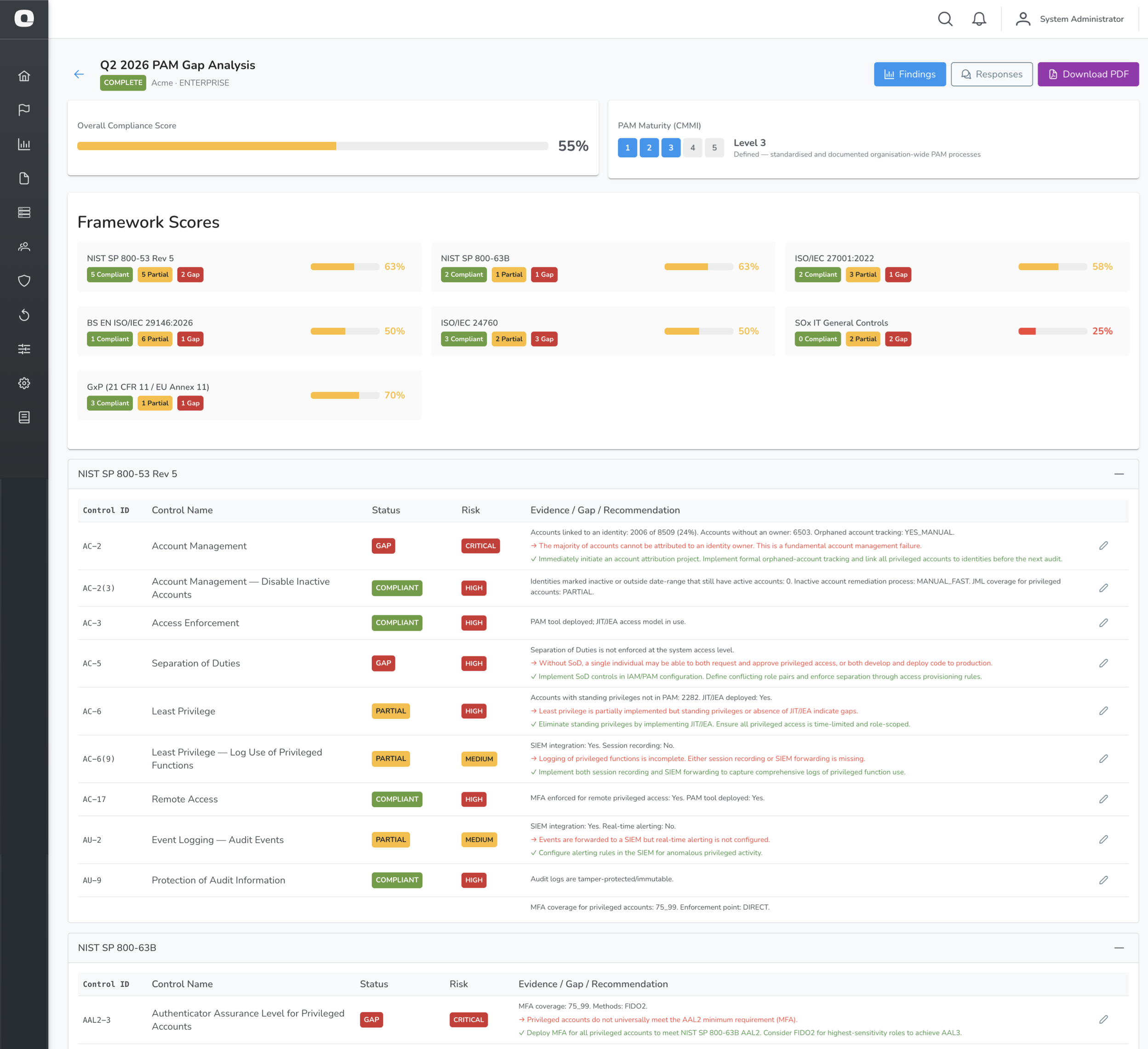
After an assessment is completed, navigate to Findings (the default view) to see the control-by-control evaluation.
Framework Summary
At the top of the findings page, each framework shows:
| Element | Description |
|---|---|
| Compliant | Controls fully satisfied |
| Partial | Controls partially satisfied |
| Gap | Controls with identified gaps |
| N/A | Controls not applicable to this assessment |
| Score | Overall compliance percentage for the framework |
Finding Detail
Each row in the findings table represents a single framework control:
| Column | Description |
|---|---|
| Control ID | Framework reference (e.g., AC-2, A.9.2.3) |
| Control Name | Short name of the control |
| Status | Compliant, Partial, Gap, or Not Applicable |
| Risk | Critical, High, Medium, Low, or Informational |
| Evidence / Gap / Recommendation | Detail of what was found and what action is needed |
Controls are grouped by framework. Click a framework panel header to collapse or expand it.
Overriding a Finding
If a finding does not accurately reflect your environment, an administrator can override it:
- Click the override icon on a finding row
- Select the corrected status
- Enter a justification
- Click Save Override
Overrides are recorded with the justification and are visible in the PDF export.
Responses
Click Responses to see a read-only view of all questionnaire answers, grouped by section.
This view shows:
- Assessor responses — answers entered directly in OrbisID
- Delegatee responses — one panel per submitted delegation, showing the signatory name, submission date, and their answers
Downloading the PDF Report
Click Download PDF to generate a full assessment report. The PDF includes:
| Section | Content |
|---|---|
| Cover page | Assessment title, date, licensed organisation, and edition |
| Executive Summary | Overall maturity score (CMMI level), framework scores, and key risk indicators |
| AI-Generated Risk Summary | Short plain-English narrative of the findings, generated when the assessment completes (see AI Assistant) — omitted entirely if the feature is off |
| Framework Findings | Control-by-control results for each applicable framework |
| Risk Summary | Findings grouped by risk level |
| Remediation Roadmap | Prioritised list of recommended actions |
| Appendix A — Methodology | Explanation of the scoring approach |
| Appendix B.1 — Assessor Responses | Full questionnaire Q&A from the primary assessor |
| Appendix B.2+ — Delegatee Responses | One appendix section per submitted delegation, including signatory name and submission date |
The PDF is generated on demand and reflects the assessment state at the time of download. If the AI Risk Narrative is enabled, a Regenerate button on the assessment page refreshes the cached narrative before your next download — it does not rewrite PDFs you've already exported.
Threat Detections and Gap Analysis
If you have deployed Endpoint Sensors, OrbisID automatically incorporates your Threat Detection activity as evidence when evaluating monitoring controls. No extra configuration is required.
How it works
When you complete an assessment, OrbisID takes a snapshot of your current Threat Detection state:
| Data point | Used for |
|---|---|
| Active Endpoint Sensors (online count) | Evidence that real-time Windows endpoint monitoring is in place |
| Open Threat Detections | Shows the engine is actively generating detections |
| Confirmed Threat Detections | Analyst review evidence — demonstrates detections are being triaged |
This data is factored into the following controls:
| Control | Framework | Effect |
|---|---|---|
| AU-2 Event Logging — Audit Events | NIST 800-53 | Active sensors + SIEM = Compliant. Active sensors without SIEM = Partial (with recommendation to forward via CEF syslog) |
| AC-6(9) Log Use of Privileged Functions | NIST 800-53 | Active sensors count as partial logging coverage for Windows endpoints |
| A.8.15 Logging | ISO/IEC 27001 | Active sensors count toward the alerting dimension |
| 29146-8.1 Access Event Monitoring | BS EN ISO/IEC 29146:2026 | Active sensors count as real-time alerting evidence. Active sensors + SIEM = Compliant |
| ITGC-OP-1 Monitoring of Privileged Activity | SOx ITGC | Active sensors + confirmed detections = Compliant. Active sensors without SIEM = Partial (SOx requires 7-year log retention via a SIEM) |
| HIPAA-164.312(b) Audit Controls | HIPAA | Active sensors count toward the real-time alerting requirement alongside SIEM integration and immutable logs |
| HIPAA-164.308(a)(6) Security Incident Procedures | HIPAA | Confirmed Threat Detections demonstrate active incident triage; active sensors alone provide partial credit |
Answering "No" to monitoring questions
If you answer No to "Is there real-time alerting configured for anomalous privileged activity?" or "Are privileged access events forwarded to a SIEM?", the recommendation for affected controls will include guidance on how OrbisID Endpoint Sensors can help close the gap — including using the built-in CEF syslog integration to forward detections to a SIEM.
Building SOx evidence with Threat Detections
For SOx in-scope assessments, the ITGC-OP-1 control requires evidence that privileged activity is both monitored and reviewed. To satisfy both:
- Deploy at least one Endpoint Sensor (provides the monitoring evidence)
- Confirm at least one genuine Threat Detection in the Threat Detections page (provides the analyst-review evidence)
- Enable CEF syslog forwarding to a SIEM for log retention (Administration → Settings)
BS EN ISO/IEC 29146:2026 — Access Management Framework
BS EN ISO/IEC 29146:2026 is the British Standard adoption of the international access management framework. It focuses specifically on how organisations govern, control, and monitor access rights — making it a natural fit for PAM programmes.
Controls Evaluated
| Control ID | Control Name | Key Evidence Sources |
|---|---|---|
| 29146-5.2 | Access Management Policy | Formal Access Management Policy documented; formal definition of privileged access in place |
| 29146-6.1 | Entitlement Lifecycle Management | JML process covering privileged access; inactive identity remediation SLA; OrbisID detected inactive identities with active accounts |
| 29146-6.2 | Privileged Access Controls | PAM tool deployed; JIT/JEA in use; privileged elevation process (PAM-managed preferred); PAM coverage percentage from OrbisID |
| 29146-6.3 | Access Certification | Review frequency; risk-based stratification (high-risk accounts certified more frequently) |
| 29146-7.1 | Separation of Duties | SoD enforced at system access level |
| 29146-7.2 | Role and Entitlement Management | Role management approach (formal RBAC or entitlement catalogue); formal change management for access changes |
| 29146-7.3 | Emergency Access Management | Documented and tested break-glass procedure |
| 29146-8.1 | Access Event Monitoring | SIEM integration; real-time alerting; OrbisID Endpoint Sensors count as alerting evidence |
Key Questions (Section 4 — Access Governance)
Three questions were added to the Access Governance section specifically to support this framework:
| Question | Purpose |
|---|---|
| Does your organisation have a formally documented and approved Access Management Policy? | Drives 29146-5.2 |
| How are roles and access permissions managed? | Drives 29146-7.2 (RBAC Formal, Entitlement Catalogue, etc.) |
| How is temporary privileged access elevation requested and approved? | Drives 29146-6.2 (PAM-managed elevation is the strongest control) |
ISO/IEC 24760 — Identity Management Framework
ISO/IEC 24760 is a multi-part international standard that defines the framework for managing identities throughout their lifecycle — from proofing and provisioning through to de-provisioning and reconciliation. It applies to both human and non-human identities.
Controls Evaluated
| Control ID | Control Name | Key Evidence Sources |
|---|---|---|
| 24760-3.1 | Identity Lifecycle Management | JML process; identity proofing before provisioning; OrbisID detected inactive identities with active accounts |
| 24760-3.2 | Identity Proofing and Binding | Identity proofing process in place; account-to-identity linkage percentage from OrbisID |
| 24760-3.3 | Orphaned Identity Detection | Orphaned account tracking approach; OrbisID unlinked account count |
| 24760-3.4 | Identity Information Quality | Named identity owners defined; account-to-identity linkage percentage; total identity count from OrbisID |
| 24760-3.5 | Non-Human Identity Management | NHI lifecycle management approach; OrbisID non-human account count |
| 24760-4.2 | Identity Governance | Named identity owners defined; Access Management Policy in place |
| 24760-5.1 | Federated Identity Management | Federation model (fully/partially/not federated); SSO deployed |
| 24760-5.2 | Identity Reconciliation | Identity reconciliation frequency across systems |
Key Questions (Section 5 — Identity Management)
A dedicated Identity Management section (step 5 in the wizard) was added for this framework:
| Question | Purpose |
|---|---|
| Is there a formal identity proofing process before accounts are provisioned? | Drives 24760-3.1 and 24760-3.2 |
| How are non-human identity lifecycles managed? | Drives 24760-3.5 (automated lifecycle is highest maturity) |
| Is a named owner formally defined for every identity? | Drives 24760-3.4 and 24760-4.2 |
| Does the organisation use federated identity management? | Drives 24760-5.1 |
| How frequently is identity data reconciled across systems? | Drives 24760-5.2 |
OrbisID Data Used
Both frameworks make extensive use of live OrbisID metrics captured at assessment completion:
| Metric | Controls |
|---|---|
| Account-to-identity linkage % | 24760-3.2, 24760-3.4 |
| Unlinked (orphaned) account count | 24760-3.3 |
| Non-human account count | 24760-3.5 |
| Inactive identities with active accounts | 24760-3.1, 29146-6.1 |
| PAM-managed account % | 29146-6.2 |
Cyber Essentials
Cyber Essentials is the UK NCSC-backed baseline cyber security certification, covering firewalls, secure configuration, security update management, user access control, and malware protection. Because OrbisID is a PAM-focused product, each theme is scoped specifically to the privileged-access dimension rather than general estate-wide security hygiene — for example, patch management is assessed for your PAM vault/gateway and jump hosts, not your whole server estate.
Controls Evaluated
| Control ID | Control Name | Key Evidence Sources |
|---|---|---|
| CE-1 | Firewalls | Admin interfaces for boundary firewalls/gateways not exposed to the Internet (or MFA-protected); default credentials changed |
| CE-2 | Secure Configuration of Privileged Accounts | Default/unnecessary administrative accounts removed; default credentials changed; OrbisID unclassified-entitlement count |
| CE-3 | Security Update Management for Privileged Access Infrastructure | Patch cadence for the PAM vault/gateway, jump hosts, and privileged access workstations; unsupported software removed; OrbisID scan failure rate |
| CE-4 | User Access Control | Administrative accounts kept separate from standard-use accounts; PAM tool deployed; MFA coverage; OrbisID standing/shared privileged account counts |
| CE-5 | Malware Protection on Privileged Access Pathways | Anti-malware (or allow-listing/sandboxing) deployed on PAM jump servers, bastion hosts, and privileged access workstations |
Key Questions
Cyber Essentials questions are embedded across the PAM Tooling, Access Governance, and Authentication sections, shown only once you mark Cyber Essentials in scope:
| Question | Section | Purpose |
|---|---|---|
| Are admin interfaces for firewalls/gateways protected from the Internet? | Authentication | Drives CE-1 |
| Are default credentials changed on firewalls, network devices, and privileged accounts? | Authentication | Drives CE-1, CE-2 |
| Are default/unnecessary privileged accounts removed? | Access Governance | Drives CE-2 |
| Are administrative accounts kept separate from standard accounts? | Access Governance | Drives CE-4 |
| How quickly are patches applied to your privileged access infrastructure? | PAM Tooling | Drives CE-3 |
| Is unsupported software removed from your privileged access infrastructure? | PAM Tooling | Drives CE-3 |
| Is malware protection deployed on PAM jump servers/privileged access workstations? | PAM Tooling | Drives CE-5 |
HIPAA
HIPAA controls map to the Security Rule's technical safeguards (§164.312) and administrative safeguards (§164.308) as they relate to privileged access to systems handling electronic protected health information (ePHI).
Controls Evaluated
| Control ID | Control Name | Key Evidence Sources |
|---|---|---|
| HIPAA-164.312(a)(2)(i) | Unique User Identification | Unique user IDs confirmed for ePHI system access; OrbisID shared privileged account count |
| HIPAA-164.312(a)(2)(iii) | Automatic Logoff | Session timeout / automatic logoff policy enforcement |
| HIPAA-164.312(a)(2)(iv)/(e)(1) | Encryption and Decryption / Transmission Security | Encryption at rest; encryption in transit for privileged/administrative access |
| HIPAA-164.312(b) | Audit Controls | SIEM integration; immutable audit logs; real-time alerting; OrbisID Endpoint Sensors count as alerting evidence |
| HIPAA-164.312(d) | Person or Entity Authentication | MFA coverage for privileged access to ePHI systems |
| HIPAA-164.308(a)(4) | Information Access Management — Minimum Necessary | Minimum-necessary access provisioning standard; OrbisID standing privileges count |
| HIPAA-164.308(a)(3) | Workforce Security — Termination Procedures | Inactive-identity remediation process and SLA; OrbisID inactive-identity-with-active-account count |
| HIPAA-164.308(b) | Business Associate Contracts | Business Associate Agreements tracked for third parties with privileged access |
| HIPAA-164.308(a)(6) | Security Incident Procedures | Documented breach-notification procedure; OrbisID Threat Detection activity as evidence of active triage |
Key Questions
Embedded across Identity Management, Access Governance, and Audit & Monitoring, shown only once HIPAA is marked in scope:
| Question | Section | Purpose |
|---|---|---|
| Does every workforce member use a unique user identifier, with no shared or generic logins? | Identity Management | Drives HIPAA-164.312(a)(2)(i) |
| Is access provisioned on a minimum-necessary basis? | Access Governance | Drives HIPAA-164.308(a)(4) |
| Are Business Associate Agreements tracked for third parties with privileged access? | Access Governance | Drives HIPAA-164.308(b) |
| Is ePHI encrypted in transit for privileged/administrative sessions? | Audit & Monitoring | Drives HIPAA-164.312(a)(2)(iv)/(e)(1) |
| Is there a documented security incident/breach notification procedure? | Audit & Monitoring | Drives HIPAA-164.308(a)(6) |
Assessment List
Navigate to Reports > PAM Gap Analysis to see all assessments.
| Column | Description |
|---|---|
| Title | Assessment name |
| Status | DRAFT, IN_PROGRESS, or COMPLETE |
| Frameworks | Which frameworks were evaluated, including SOx, GxP, Cyber Essentials, and HIPAA when in scope |
| CMMI Level | Maturity level (1–5) calculated at completion |
| Created | Date the assessment was created |
| Completed | Date the assessment was finalised |
Click an assessment row to open it.
Deleting an Assessment
- Click the delete icon on an assessment row
- Confirm the prompt
Deletion is permanent and removes all responses and findings. It is recorded in the Audit Log.