
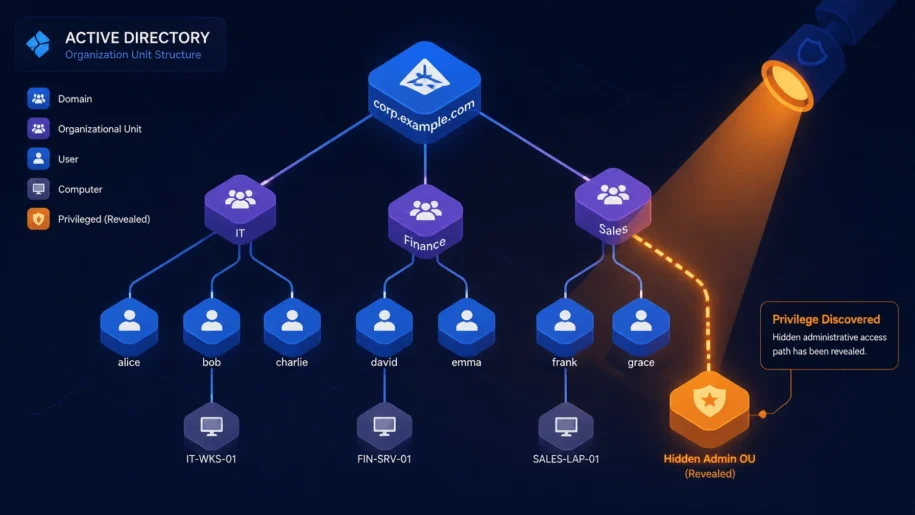
If you have spent any time managing Active Directory (AD) in a large enterprise, you probably think you have a handle on who has admin rights. You have your "Domain Admins" group, your "Enterprise Admins," and maybe a few service accounts that you keep a close eye on.
But here is the hard truth: your AD is likely crawling with "Shadow Admins": identities that have the power to take over your entire domain but do not appear in any of your standard privileged groups.
At OrbisID, we see this all the time. Companies pass their audits, check their membership lists, and still remain vulnerable to "shadow privilege" risks that traditional tools simply miss. In this guide, we are going to show you how to find what is really hiding in your AD and how to conduct a shadow privilege audit that actually works.
Intro: The Reality of Shadow Privilege
"Shadow privilege" refers to hidden or unintended paths to administrative power. These are accounts that can reach administrative-level control via Access Control Lists (ACLs) and other permissions, even though they are not members of well-known admin groups.
Because these accounts fly under the radar, they are a favorite for attackers. Once a threat actor gains access to a seemingly "low-privileged" account that happens to have the right ACLs (like the ability to reset a Domain Admin's password), your entire Tier 0 infrastructure is at risk.
Why Shadow Privilege is an IAM Governance Nightmare
From an IAM governance perspective, shadow privilege is problematic because it:
- Breaks the link between "role" and "effective privilege": Your documentation says a user is a "Helpdesk Analyst," but their effective privilege in AD is "Domain Admin."
- Undermines access certification: Managers certify users as non-privileged because they only see group memberships, unaware of the hidden escalation paths.
- Bypasses PAM controls: If an account isn't identified as privileged, it isn't put into your Privileged Access Management (PAM) vault.
Anatomy of a Shadow Privilege: How it Happens
Shadow privilege does not usually happen because of malice; it happens because of "permission drift" over years of manual administration.

Specs: Common Shadow Admin Paths
We have categorized the most common ways shadow privileges manifest in enterprise environments:
- Direct ACL Grants: An account is given
Full ControlorGenericAllrights over a Domain Controller object or a sensitive OU. - Password Reset Rights: A non-admin account is granted the
Reset Passwordpermission on an account that belongs to the Domain Admins group. - GPO Modification: An account has the right to modify a Group Policy Object (GPO) that is linked to a Tier 0 system.
- Transitive Paths: Account A can manage Account B, which can manage a server that hosts your ADFS token-signing keys. Account A is now effectively a shadow admin for your entire cloud estate.
The 6-Step Shadow Privilege Audit Process
We recommend a structured approach to identifying and governing these risks. You can find more technical details in our official documentation.
Step 1: Define Your Tier 0 Scope
Before you can find shadow admins, you need to know what they are trying to access. This includes:
- Domain Controllers and Schema Masters.
- ADFS and federation servers.
- Azure AD Connect sync servers.
- Hypervisors hosting any of the above.
Step 2: Baseline Your "Known Admins"
Enumerate every account in your built-in high-privilege groups. This is your baseline. Any account discovered in the next steps that is not in this list is a "Shadow Admin."
Step 3: Automate Discovery and Reconciliation
This is where manual spreadsheets fail. You need to scan the ACLs of every sensitive object in AD. We designed OrbisID to automate this entire process, scanning AD forests and domains to surface every privileged account: whether known or unknown.

As shown in the dashboard above, we reconcile discovered accounts against your existing PAM tool. This immediately flags the "Shadow Privilege" gap: the accounts that have admin-level rights but are not yet governed.
Step 4: Classify Human vs. Non-Human Identities
Not all shadow admins are people. Often, they are service accounts or "ghost" accounts left over from old integrations. We intelligently categorize every account to provide clarity. If a service account has the power to change a Domain Admin's password, that is a critical risk that needs immediate remediation.
Step 5: Perform a PAM Gap Analysis
Once you have identified your shadow admins, you need to measure the risk. Our platform provides a PAM Gap Analysis that compares your discovered privileged estate against your managed scope.

This allows you to see exactly where your governance falls short and provides specific recommendations for remediation based on frameworks like NIST and ISO 27001.
Step 6: Continuous Monitoring and KRI Reporting
A shadow privilege audit is not a "one-and-done" task. AD is dynamic. Permissions change daily. We provide real-time dashboards that track Key Risk Indicators (KRIs) over time.

By monitoring trends in privileged access, you can catch "permission drift" before it becomes a vulnerability. This is essential for maintaining compliance with SOx, GxP, and other regulatory requirements.
Aligning with Global Compliance Frameworks
Audit findings often stem from the inability to prove that all privileged access is governed. We help you map your findings directly to the requirements of:
- NIST SP 800-53: Specifically controls for least privilege and account management.
- ISO 27001: Requirements for access control and the prevention of unauthorized access.
- SOx & GxP: Ensuring that administrative changes to financial or quality-impacted systems are performed by authorized, known accounts.
Why Manual Spreadsheets are Dangerous
If you are still using manual exports from AD and checking them against a spreadsheet, you are missing the "shadow" in shadow privilege. Spreadsheets are:
- Outdated the moment they are saved: AD changes too fast for manual tracking.
- Blind to transitive paths: A spreadsheet cannot show you a complex path of "Account A controls Group B which controls Server C."
- Prone to human error: It is easy to miss a direct ACL grant on a single object among thousands.
Conclusion: Take Back Control of Your AD
Shadow privilege is one of the most significant unmanaged risks in modern enterprise security. By following a structured audit process and moving away from manual tracking, you can eliminate the "shadow" and ensure every admin-level account is known, governed, and secured.
We invite you to download our latest platform update or visit orbisid.com to learn how we can help you automate your privileged access discovery and governance. Let's get those hidden admins out of the shadows.
{“name”:”How to Conduct a Shadow Privilege Audit in Active Directory”,”step”:[{“name”:”Define Tier 0 Scope”,”text”:”Identify all critical AD assets including Domain Controllers, ADFS, and Azure AD Connect servers.”,”@type”:”HowToStep”},{“name”:”Baseline Known Admins”,”text”:”Enumerate accounts in built-in admin groups like Domain Admins and Enterprise Admins.”,”@type”:”HowToStep”},{“name”:”Automate ACL Discovery”,”text”:”Use OrbisID to scan AD objects for direct ACL grants and hidden escalation paths.”,”@type”:”HowToStep”},{“name”:”Perform PAM Gap Analysis”,”text”:”Compare discovered privileged accounts against your managed PAM scope to identify ungoverned accounts.”,”@type”:”HowToStep”},{“name”:”Remediate and Monitor”,”text”:”Remove unnecessary privileges and implement continuous KRI monitoring for compliance.”,”@type”:”HowToStep”}],”@type”:”HowTo”,”@context”:”https://schema.org”,”publisher”:{“url”:”https://orbisid.com”,”name”:”OrbisID”,”@type”:”Organization”},”description”:”A guide for IAM governance teams to identify and remediate hidden administrative paths in AD.”}